01
Upload the design
Transparent PNG works best; JPG and WEBP work too.
Upload your design, pick the shirt color and print size, and get a mockup accurate to the centimeter instantly. Download a PNG to send for customer approval or use in your store.
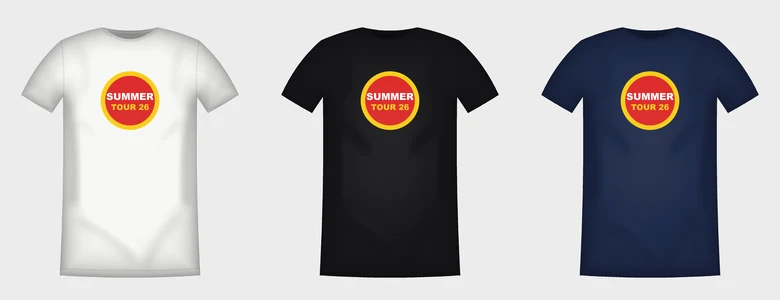
Transparent PNG works best; JPG and WEBP work too.
Chest, pocket or back; print width in centimeters.
One color or all of them, for customer approval and store images.
Customers won't say yes until they see the design on a shirt, and a late 'it should have been bigger' is the most expensive mistake. The mockup shows the design in the color and size you choose, so approval is based on real size, not a screenshot.
The shirt template is scaled to a size L (52 cm chest). Enter the print width and distance from the collar in centimeters and the design sits on the shirt at exactly that size. 25–30 cm is common for center chest, 8–10 cm for a pocket logo and 28–32 cm for the back.
The design isn't pasted on like a flat rectangle: the shirt's folds and edge shadows fall across it too, so the print looks like it sits in the fabric. Fold highlights are kept on dark shirts as well.
Your design isn't uploaded to the server; the mockup is drawn entirely in your browser.
The preview is open to everyone; PNG downloads are on paid plans. It doesn't use your minutes.
For now there's a built-in shirt template; use the color picker to match any shirt color exactly.
A 2000 × 2200 pixel PNG, downloaded on a transparent, white or studio gray background.
Check your design file before printing: resolution, background, white halo, thin lines and small pieces that may fall off.
OpenBackground removerPrint-ready transparent PNGs for DTF and gang sheets: no white halo, semi-transparent edges or specks.
OpenBlack knockout and outlineKnock out black for dark shirts and add a white or colored outline around your design; hard-edged DTF PNG.
OpenAI image upscalerUpscale low-resolution designs up to 4x; crisp lines, 300 DPI print size, transparency preserved.
OpenGang sheet builderAuto-nest your designs onto a DTF roll: spacing, rotation, shortest length; 300 DPI PNG and PDF.
OpenBulk names and numbersGenerate a name and number PNG for every player from a list for team jerseys; arc, outline, 300 DPI, one click to gang sheet.
OpenPrint preflight is included in the free plan; the other DTF tools are on DTF plans.
No credit card · Cancel anytime